This feature allows you to precisely define which HTML tags can be used and preserved within the content generated by Artificial Intelligence. This functionality is active for attributes where the "Allow HTML" option is enabled.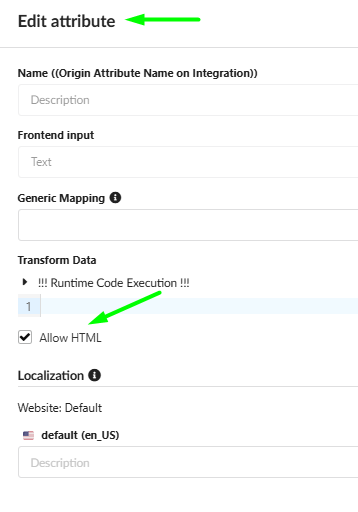
By defining this list, you unlock powerful possibilities for generating content with specific formatting or embedding multimedia directly into the generated text.
How the System Processes Tags
The system works as a security filter:
It automatically removes any tags that are not present in the allowed list.
This ensures that only necessary and safe tags are displayed correctly on your frontend.
Unleashing Creative Potential
Defining allowed tags means you are no longer limited to basic text formatting. You can instruct the AI to create complex structures by adding dynamic and visual elements directly into your product description:
Interactive Content: Embed YouTube videos (using the
iframetag) directly into the product description.Rich Visuals: Integrate image galleries or sliders using the
imgtag wrapped in your required structure (div,section).Enhanced Structure: Create interactive elements, such as accordions for FAQ sections, using
detailsandsummarytags (which are in the Default list) or custom structure tags.Any Structure: You can generate practically any HTML structure supported by your frontend simply by allowing the necessary tags.
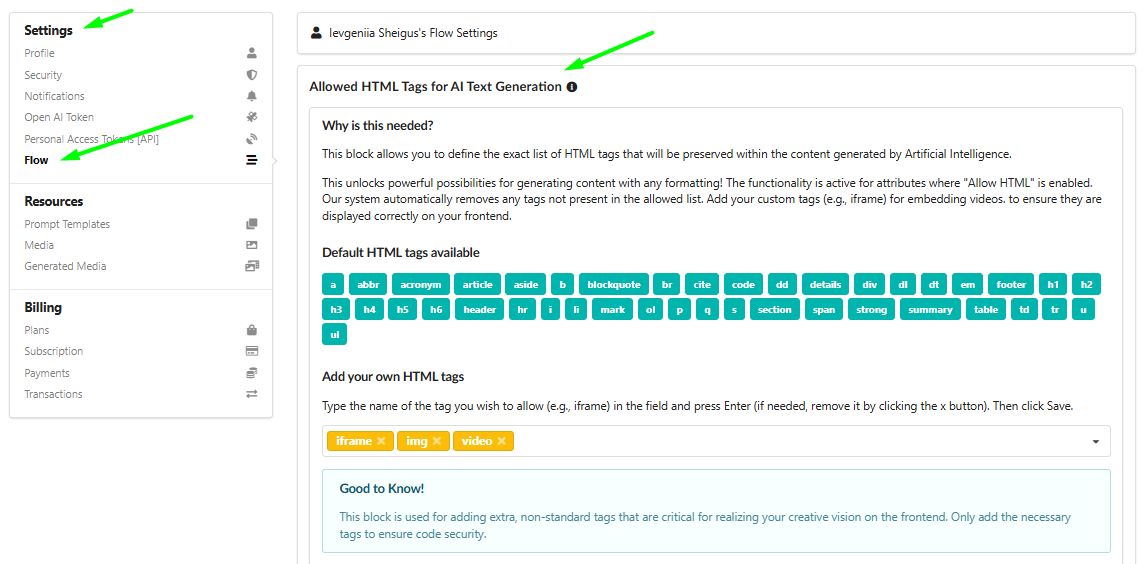
1. Default HTML Tags Available
A comprehensive list of standard HTML tags is available by default and can be used immediately:
a,abbr,acronym,article,aside,b,blockquote,br,cite,code,dd,details,div,dl,dt,em,footer,h1,h2,h3,h4,h5,h6,header,hr,i,li,mark,ol,p,q,s,section,span,strong,summary,table,td,tr,u,ul.
2. Add Your Own HTML Tags (Add Your Own HTML Tags)
If you require tags for embedding video, images, or any other non-standard formatting, you can add them to this list.
How to Add Custom Tags:
Type the name of the tag you wish to allow (e.g.,
iframe,img,video), into the field.
Press Enter (if needed, remove it by clicking the 'x' button).
Click the Save button.

Good to Know! This block is used for adding extra, non-standard tags that are critical for realizing your creative vision on the frontend. Only add the necessary tags to ensure code security.
Was this article helpful?
That’s Great!
Thank you for your feedback
Sorry! We couldn't be helpful
Thank you for your feedback
Feedback sent
We appreciate your effort and will try to fix the article