This article explains how to set up full automation for your product metadata (titles, descriptions, focus keywords) using the Yoast SEO integration with Fozzels.
Feature Overview
This integration allows Fozzels to directly manage your product's SEO parameters via API. Once generated, these fields are automatically synchronized with your WooCommerce store.
Available attributes for mapping:
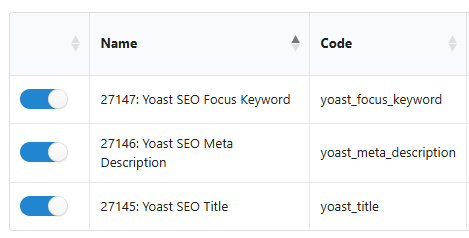
Yoast SEO Title (
yoast_title)Yoast SEO Meta Description (
yoast_meta_description)Yoast SEO Focus Keyword (
yoast_focus_keyword)
Step-by-Step Setup
Step 1: Requirements (WooCommerce side)
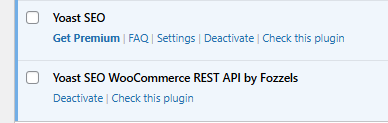
For successful synchronization, your WordPress site must have two active plugins:
Yoast SEO – The core plugin for search engine optimization management.
Yoast SEO WooCommerce REST API by Fozzels – Our dedicated connector plugin that enables the transfer of generated data back to your store.
Important: Synchronization of SEO fields is not possible without the Fozzels connector plugin. You can download it at the bottom of this article.
Step 2: Activation in Fozzels
Navigate to the Integrations section and select your WooCommerce integration.
In the Configuration tab, find the "Yoast WooCommerce SEO" option.
Enable the toggle and click SAVE.

Step 3: Data Structure Update
To make the new attributes visible in the Fozzels interface, you must update your data schema:
Go to the Websites & Stores tab and click Pull Stores/Websites.
Run a full Product Pull (Pull Products).
Once the pull is complete, the attribute list will refresh, and fields with the
yoast_prefix will become available for mapping in your Flows.
The Ultimate Combo: WPML + Yoast + ACF
Fozzels allows you to reach the "Gold Standard" of e-commerce by combining:
WPML Support: For multilingual SEO.
ACF (Advanced Custom Fields): For specialized technical data.
Yoast SEO: For search engine dominance. You can automate all these fields simultaneously for every language version of your store.
Was this article helpful?
That’s Great!
Thank you for your feedback
Sorry! We couldn't be helpful
Thank you for your feedback
Feedback sent
We appreciate your effort and will try to fix the article