The Suspicious Words & Phrases feature is more than just a simple validation filter - it is a sophisticated tool for managing high-volume content workflows. It ensures your product descriptions remain professional by flagging AI hallucinations, technical artifacts, or unwanted terms across multiple languages simultaneously.
Configuration: Global & Multilingual Control
To manage your word list, navigate to Settings > Flow > Suspicious Words & Phrases tab.
1. Managing the Word List
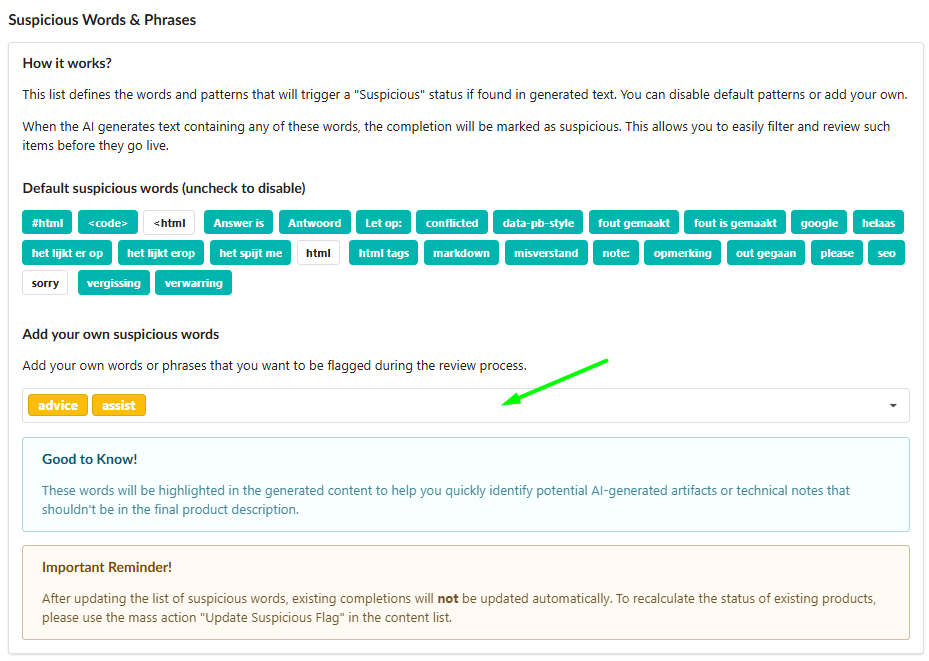
Fozzels comes pre-configured with common AI artifacts (#html, note:, sorry, etc.). You can:
Toggle terms on/off: Simply uncheck the tags you don’t need.
Add custom terms: Type any word or phrase (e.g., competitor names, brand-specific sensitive terms) and press Enter.
Multilingual Support: You can add "stop-words" in any language. This is incredibly useful for international stores where you need to track specific errors for different localizations (e.g., English "sorry" vs. Dutch "let op") at the same time.
How It Works: Dynamic Status Management
The system operates in real-time. As soon as a term from your list appears in a generated text:
The product is marked with a "Suspicious" status.
The flagged words are highlighted directly in the text editor.
This gives you the choice: manually edit, regenerate the content, or adjust your settings to clear the flag.
Instant Mass Corrections
The true power of this feature lies in its dynamic nature. If a "Suspicious" status was triggered by mistake (e.g., you added "sorry" as a stop-word, but then launched a brand named "Sorry Boy"), you don’t have to edit hundreds of descriptions:
Disable or remove the word from your Suspicious list in Settings.
The system instantly updates the status for all existing completions. They will lose the "Suspicious" flag and become ready for mass synchronization immediately.
Efficiency in the Daily Total Batch List
We’ve optimized your workspace with a dedicated filter to streamline your daily checks:
Show only suspicious: Use this toggle in the Daily Total Batch List to instantly isolate every result that needs your attention.
Instead of reviewing the entire batch, you can focus specifically on flagged items, see the highlighted words, and decide whether to fix the text or refine your global word list to clear the entire batch at once.
Forcing an Update (Update Suspicious Flag)
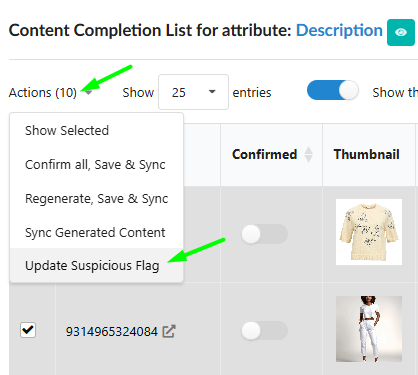
While the status updates dynamically, you can always manually trigger a recalculation for your broader catalog. In your Content List, select the products and use the Mass Action: "Update Suspicious Flag" to re-scan them against your most current settings.
Summary
This feature acts as your "command center" for content quality. Whether you are catching technical glitches or managing brand safety across international borders, you are always in total control of what gets published to your store.
Was this article helpful?
That’s Great!
Thank you for your feedback
Sorry! We couldn't be helpful
Thank you for your feedback
Feedback sent
We appreciate your effort and will try to fix the article