All in One SEO (AIOSEO) is the leading WordPress plugin designed to improve search rankings and drive organic traffic by automating critical SEO elements like meta tags and social previews.
We are thrilled to announce full integration between Fozzels and AIOSEO for WooCommerce! This powerful combination allows you to treat SEO fields as standard product attributes. You can now:
Automate at Scale: Generate unique, AI-optimized SEO titles and descriptions for thousands of products simultaneously.
Social Media Mastery: Automatically manage Twitter Cards and Open Graph data to ensure your products look perfect when shared on social platforms.
Smart Workflows: Use Content Flows to edit and transform SEO data just like any other product attribute.
Seamless Sync: Eliminate manual data entry by instantly pushing AI-generated content directly into your WooCommerce store via our dedicated API connector.
This guide explains how to connect Fozzels, WooCommerce, and All in One SEO (AIOSEO) to automate your store's metadata. By following these steps, your SEO fields will behave like standard product attributes, allowing you to generate and sync search-optimized content in bulk.
Step 1: Verify and Activate AIOSEO in WordPress
Ensure the core SEO plugin is active on your WooCommerce site:
Log in to your WordPress Admin Dashboard.
Navigate to Plugins > Installed Plugins.
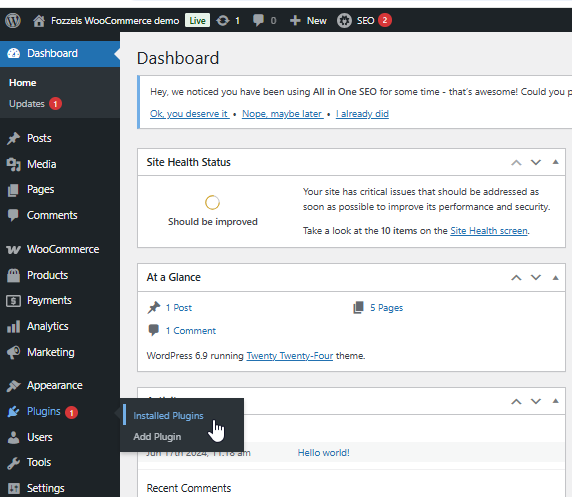
Locate All in One SEO in the list:
If disabled, click Activate.
If active, you can click Check this plugin to verify its current health and settings.

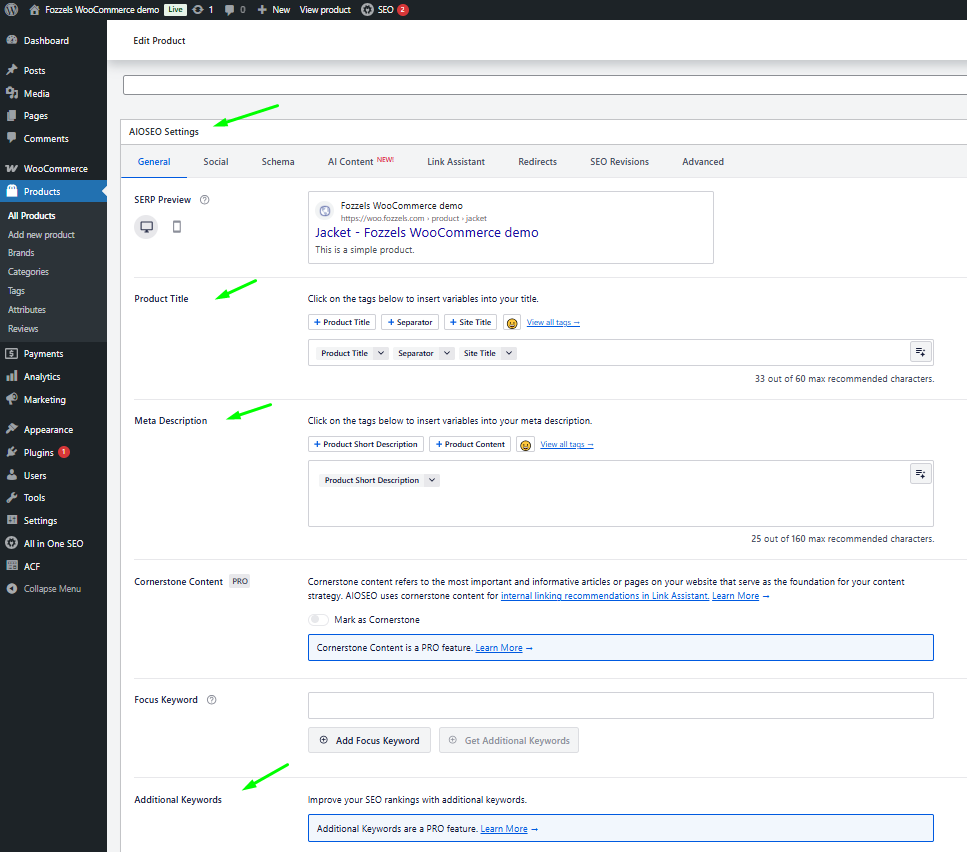
Verify Fields: Open any product under Products. Scroll down to the AIOSEO Settings block. You should see the standard fields for Product Title and Meta Description.
Step 2: Install the "AIOSEO API Sync by Fozzels" Plugin
Standard AIOSEO settings only allow external tools to read data. To sync generated content back to your store, you must install our specialized connector:
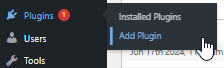
In your WordPress menu, go to Plugins > Add Plugin.
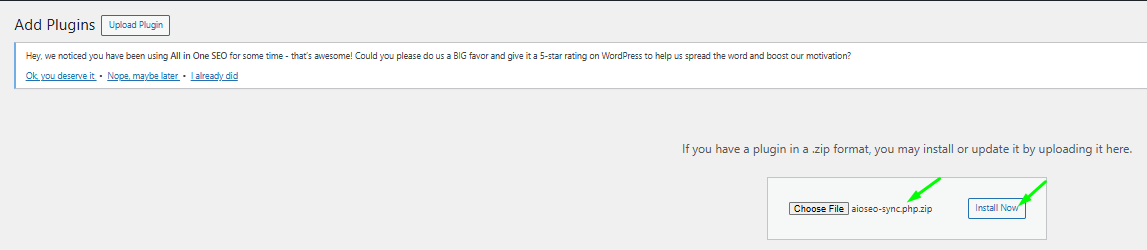
Click Upload Plugin at the top of the page.

Select the provided ZIP file (AIOSEO API Sync by Fozzels), click Install Now, and then Activate.
This plugin enables the secure two-way transfer of SEO metadata via the WordPress API.
*** You can download the necessary ZIP file for the 'AIOSEO API Sync by Fozzels' plugin, which is attached at the bottom of this article.
Step 3: Enable Support in Fozzels
Activate the integration within the Fozzels platform:
Open your Configuration Tab in your existing or new WooCommerce Integration in Fozzels.
Locate the section: "All in One SEO – Powerful SEO Plugin to Boost SEO Rankings & Increase Traffic".
Switch the toggle to On and SAVE changes.
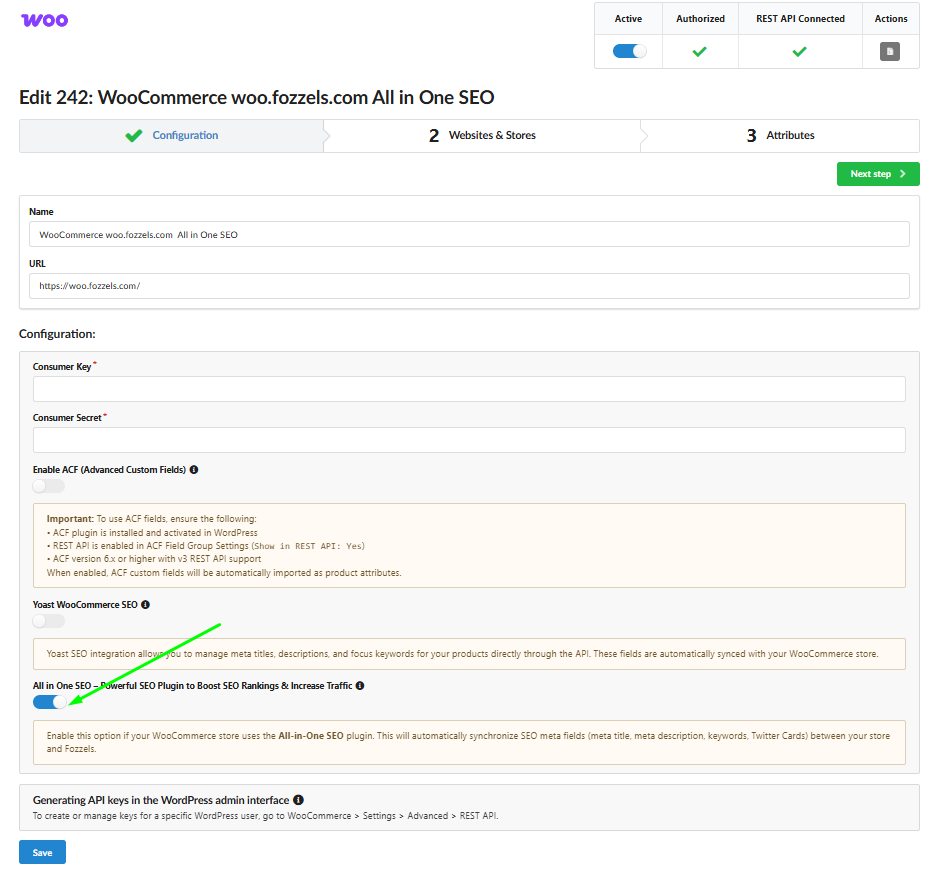
Step 4: Identification of SEO Attributes
Once activated, all SEO-related fields will automatically appear in your general Fozzels attribute list. They are easy to identify and pre-configured for immediate use:
Technical Codes: Every SEO attribute is labeled with a specific code starting with
_aioseo_(e.g.,_aioseo_title,_aioseo_description,_aioseo_keywords).Default Settings: For your convenience, these attributes are automatically set to:
Active
Allowed HTML
Filterable
Social Media: You can also manage social previews via attributes like
_aioseo_twitter_titleor_aioseo_og_title.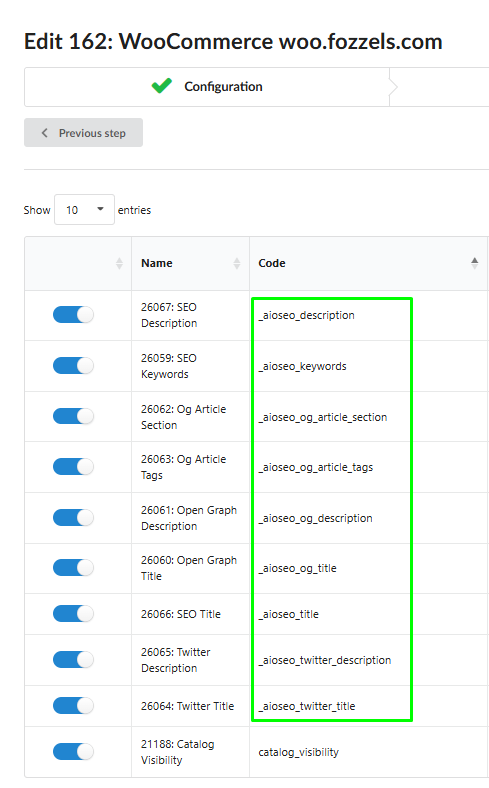
Step 5: Content Flows and Synchronization
The biggest advantage of this integration is that SEO fields now behave like regular product data. You are no longer limited to basic syncing:
Create Custom Flows: You can build specific Content Flows for these attributes. Use your existing AI templates or create new ones to generate optimized SEO titles and descriptions.
Standard Workflow: Treat SEO attributes like any other product field—edit them, apply filters, or map them to different data sources within Fozzels.
Instant Update: Once your generation is complete, click Sync to Store. Fozzels will instantly populate the corresponding AIOSEO fields on your WooCommerce site with the new AI-generated content.
Was this article helpful?
That’s Great!
Thank you for your feedback
Sorry! We couldn't be helpful
Thank you for your feedback
Feedback sent
We appreciate your effort and will try to fix the article